Introduction
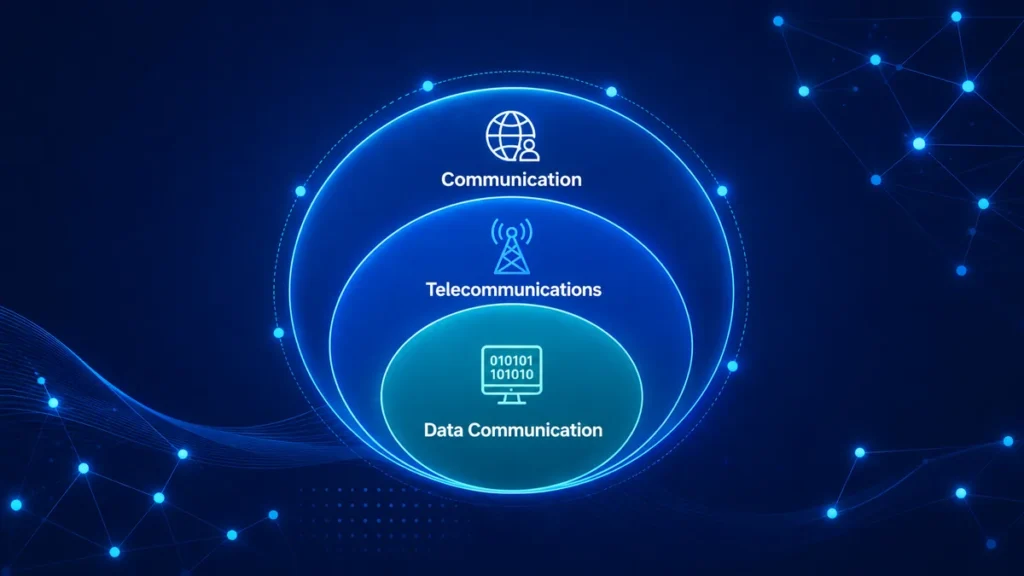
Computer networks are the most important pillar of “information and communications technologies,” i.e., ICT domain. ICT refers to any digital technology used to manage information and facilitate communication, such as hardware, software, networks, and the Internet. It combines computation and telecommunications to improve data storage, transport, and processing.
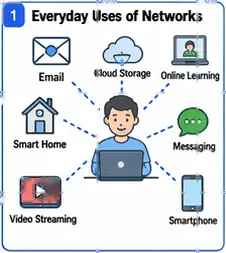
ICT services rely on computer networks for connectivity. Email, web browsing, cloud storage, video streaming, business systems, online learning, smart gadgets, and real-time messaging all require data to flow smoothly between people, apps, and machines.
A computer network provides the structure for devices to discover one another, exchange information, request services, and deliver digital resources over short or very long distances.
Defining a Computer Network
A computer network can be understood as a group of connected devices that work together to share data and resources. These devices may include computers, phones, servers, printers, and other network equipment.
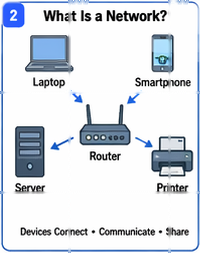
A computer network includes both the physical parts, such as cables, wireless links and fiber links, and the logical parts, such as IP addresses, routing, and communication rules.
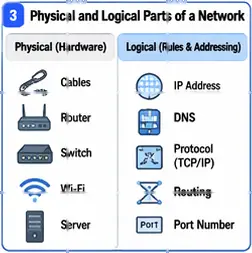
The main purpose of a computer network is to allow communication and resource sharing. The resources shared on a network can include files, printers, storage, software, websites, voice calls, video, and other digital services. In a simple network, one device may send data directly to another device. In a larger network, a client may request information from a server, and other network devices such as routers may help move that data to the correct destination.
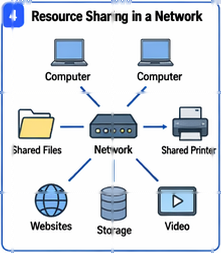
This organized system of devices, connections, and rules is what makes computer networks so important in ICT.
The Evolution of Networking Infrastructure
Standalone systems and early shared computing (1950s–1960s)
Early computers worked as standalone devices, sharing data via removable media such as magnetic tape, punch cards, and disk packs rather than a direct link. Time-sharing systems, such as CTSS at MIT in the early 1960s, allowed multiple users to share a single machine, but inter-machine communication was still manual and physical.
Packet switching and ARPANET (1969)
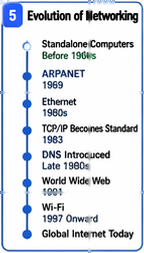
The conceptual breakthrough that enabled modern networking was packet switching: rather than holding a dedicated circuit open between two points, data could be broken into discrete blocks and routed independently across a shared network. This idea, developed theoretically by Paul Baran and Donald Davies in the mid-1960s, found its first large-scale implementation in ARPANET, which went live in 1969, connecting four university nodes. ARPANET demonstrated that geographically dispersed computers could exchange data reliably over shared infrastructure.
Formalizing the internet layer: TCP/IP (1974–1983)
As ARPANET grew, the need for a standard communication protocol became clear. Vint Cerf and Bob Kahn published the foundational TCP specification in 1974, and the protocol was later split into two distinct layers: TCP for reliable end-to-end delivery and IP for routing between networks. RFC 791, published in 1981, formalized the Internet Protocol and explicitly describes it as designed for interconnected packet-switched communication networks. On 1 January 1983, sometimes called “Flag Day,” ARPANET formally migrated to TCP/IP, establishing the protocol suite that underpins the internet to this day.
Local area networking and Ethernet (1980s)
At the same time that long-distance networks were growing, new local network systems were also being developed to connect computers inside offices, schools, and campuses. Ethernet, created at Xerox PARC by Robert Metcalfe in 1973, became the most widely used wired local network technology. Later, IEEE 802.3 set common rules for Ethernet so that devices from different companies could work together properly. During the 1980s, the growing popularity of IBM PCs increased the need for local networks, and this helped Ethernet become the leading LAN technology.
Scaling challenges: DNS and the public internet (late 1980s–early 1990s)
As the internet grew larger, it became increasingly difficult to keep one master file at Stanford Research Institute Network Information Center (SRI-NIC) that listed all computer names and addresses. This old system was too slow and difficult to manage as more computers joined the network. To address this problem, DNS was created. DNS used a distributed system, which means name information could be stored in many places instead of just one. This made the internet easier to manage and allowed it to grow. ARPANET ended in 1990, NSFNET became the main backbone, and in 1991 the internet became more open for public and business use.
The World Wide Web and mass adoption (1991–2000s)
In 1991, Tim Berners-Lee introduced a new system at CERN that used HTTP and HTML to make information easier to share and access on the internet. This system became the World Wide Web. It made the internet much easier for ordinary people to use by allowing them to move from one page to another through links. As web browsers, internet service providers, and online businesses quickly grew, internet use increased very fast, reaching billions of people over time.
Wireless networking (1990s–2000s)
The last big problem with wired networks was mobility, i.e., people wanted to stay connected while moving around. To solve this, IEEE 802.11 introduced rules for wireless local area networks, first in 1997 and later improved with 802.11b in 1999. This wireless technology later became known as Wi-Fi. Newer versions, such as 802.11g, 802.11n, 802.11ac, and 802.11ax, made Wi-Fi faster and improved its range. As a result, Wi-Fi became the most common way for portable devices to connect to networks without needing cables.
From local experiments to global infrastructure
All of these developments worked together to change networking from a few small, separate experiments into the strong and dependable system used in modern ICT today. Packet switching, TCP/IP, Ethernet, DNS, the Web, and wireless LAN each added an important part to the network. This progress did not happen in one simple step. Instead, each new technology was built on the standards created before it. Because these standards allowed different systems to work together, networks were able to grow from just four connected computers to billions of connected devices around the world.
Basic Components of a Computer Network
Before looking at the parts of a network, it is helpful to understand the main types of networks based on size. A local area network (LAN) connects devices in a small area, such as a home, office, or school campus. A metropolitan area network (MAN) covers a larger area, such as a city or a large campus. A wide area network (WAN) connects places that are far apart, such as offices in different cities or countries. The internet is the best-known example of a WAN or a collection of WANs.
At a smaller scale, a personal area network (PAN) typically refers to short-range connectivity centered on an individual and devices such as phones, wearables, and Bluetooth-enabled peripherals. At an organizational scale, an intranet is an internal network using internet technologies for private organizational purposes, while an extranet extends selected connectivity to business partners. The internet itself is the global system of interconnected networks that share common protocol foundations.
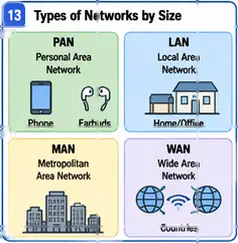
These categories matter because they reflect different design goals. A PAN emphasizes convenience and proximity. A LAN emphasizes local resource sharing and predictable performance. A WAN emphasizes reach across distance. An intranet emphasizes controlled internal use, while the internet emphasizes global interoperability across independently managed networks. In practice, modern ICT environments often combine several of these at once: a user may move from a PAN to a WLAN inside a LAN while still accessing cloud services through the internet.
End devices: hosts, clients, and servers
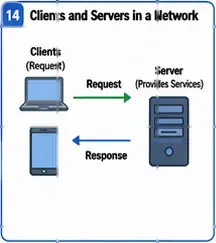
Every network has end devices, also called hosts. These include laptops, smartphones, desktop computers, and servers. Servers provide services such as websites, file storage, email, or video streaming. Clients use these services. Sometimes one device can act as both. For example, a laptop is a client when it opens a website, but it can act like a server when it shares a file with another device.
Transmission media
Devices connect to a network through different types of media. Wired connections may use copper cables, coaxial cables, or fiber-optic cables. Wireless connections use radio signals, such as Wi-Fi.
The type of media used affects how fast the network is, how far the signal can travel, how much interference it may face, and how much it costs.In practical ICT environments, data may travel over twisted-pair copper cables, fiber-optic cables, or wireless radio links.
Ethernet remains central to wired networking, and IEEE 802.3 defines Ethernet at multiple speeds and media types. Wireless local networking, by contrast, uses radio communication to connect clients and infrastructure within limited areas.
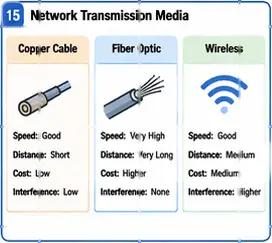
The choice of medium has practical consequences. Copper is common and economical for many local connections. Fiber supports high capacity and long distances with strong resistance to electromagnetic interference. Wireless offers mobility and flexibility, especially for user devices and environments where cabling is impractical. Network designers choose among these media based on distance, throughput requirements, reliability, cost, mobility, and security considerations.
Network interface cards
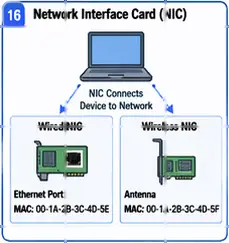
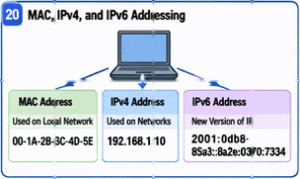
Every device needs a network interface card (NIC) to connect to a network. A NIC may provide a wired port, such as an Ethernet port, or a wireless connection through an antenna. Each NIC has a MAC address, which is a unique hardware address used to identify the device on the local network. MAC addresses are used only inside the local network and cannot be used across the internet like IP addresses.
Intermediary devices: hubs, switches, and routers
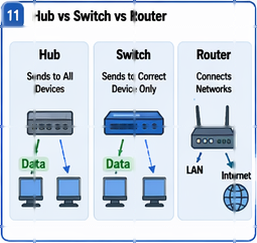
Some devices help control how data moves through a network. Early networks used hubs, which sent incoming data to every connected device. This caused extra traffic and reduced performance. Later, switches became more common. A switch sends data only to the correct device, which makes the network faster and more efficient. Routers connect different networks together and send data to the correct destination based on IP addresses. Wireless access points allow wireless devices to connect to a wired network through Wi-Fi.
The layered model: OSI and TCP/IP
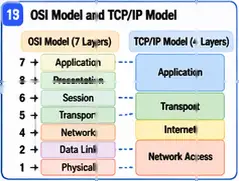
To understand how networks work, we use layered models. The OSI model has seven layers, and each layer has a different job in communication. Real networks more frequently employ the TCP/IP model. It has four layers: link (network access), internet, transport, and application. The layered design enhances networking flexibility, allowing for changes or improvements in one part without impacting the entire system.
Addressing: MAC, IPv4, and IPv6
Devices are identified in two main ways. At the local network level, they use MAC addresses. At the wider network level, they use IP addresses. IPv4 uses 32-bit addresses and was the original main internet addressing system. As the internet grew, IPv4 addresses began to run out. To deal with this issue, methods such as CIDR and NAT were introduced. Later, IPv6 was developed. IPv6 uses 128-bit addresses, which provide a much larger number of unique addresses for modern and future networks.
Naming: the role of DNS
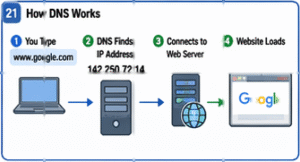
People do not usually remember IP addresses. Instead, they use names such as website addresses. The Domain Name System (DNS) changes these human-readable names into IP addresses so that computers can locate each other. Without DNS, users would need to type the numerical address of every website or service they wanted to reach.
Google Public DNS is a free, fast, and secure recursive DNS resolver offered by Google to global internet users to enhance browsing speed and security. It provides accelerated DNS lookups, improved security against threats, and accurate results without redirection
From components to infrastructure
All of these parts work together to make a network function. Cables or wireless signals carry the data; NICs connect devices; switches and routers move the data, IP addresses identify devices, and DNS helps users locate resources easily. Together, these components form the foundation of every network, from a small home setup to the global internet.
Network Topology
Network topology means the way devices and connections are arranged in a network. In simple words, it shows how computers, cables, and other network devices are connected. Topology is important because the way a network is arranged can affect its speed, strength, ease of management, and what happens when a connection fails.
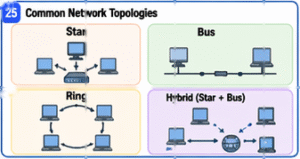
The most common types of network topology are star, bus, and ring. In a star topology, all devices connect to one central device, such as a switch or access point. This is the most common setup in modern networks because it is easier to manage and repair. If one connection fails, it usually affects only one device, not the whole network. In a bus topology, all devices share one main cable. In a ring topology, each device is connected to the next one in a circle.
These types are useful for learning because they show how the design of a network affects communication and failures, even though modern networks often use a mix of different topologies.
How Communication Happens in a Computer Network
Communication in a network starts with data. When you send a message, open a website, or watch a video, the computer changes that information into small pieces called bits. These bits travel through the network as signals using cables, fiber, or wireless connections.
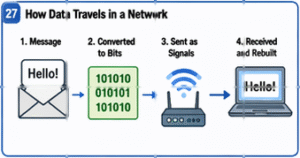
To ensure the data reaches the correct device, networks use IP addresses. These addresses help computers send and receive data across different networks.
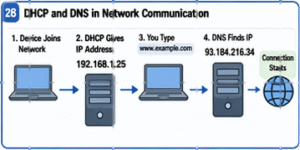
People do not usually type IP addresses because they are difficult to remember. Instead, we use easy names like google.com or youtube.com. A system called DNS (Domain Name System) changes these names into IP addresses so computers can find the correct destination. Another system called DHCP automatically gives devices the network settings they need, such as an IP address, when they join a network.
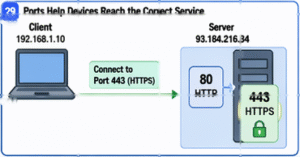
Networks also need a way to tell different services apart. This is done by using port numbers. For example, websites usually use port 80 for HTTP and port 443 for HTTPS. This means that for communication to work properly, a device needs more than just a connection. It also needs the correct IP address, the correct protocol, and the correct port number so the data can reach the right service.
Benefits, Challenges, and Limitations
Networks have many benefits. They allow people to share files, printers, internet access, and other resources easily. They also help people communicate quickly, work from different places, and access information anytime. Another benefit is that networks can grow over time by adding more users, devices, and services.
However, networks also have challenges. Occasionally they become slow because of heavy traffic, weak signals, faulty devices, or long distances. Networks can also be difficult to manage, especially when many devices are connected.
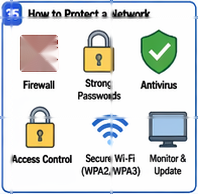
Cyber security is another major challenge. Hackers can steal data, spread malware, or break into systems if a network lacks proper protection. Wireless networks can be more risky if security settings are weak. For this reason, networks need strong passwords, firewalls, antivirus tools, access control, and regular monitoring. This scenario shows that a network must be managed and protected, not just connected.
Real-World Illustrations
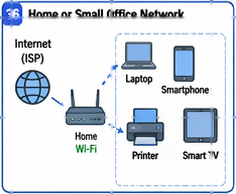
A small home or office computer network offers the clearest introductory example. A wireless internet router or gateway connects the site to an internet service provider. End devices such as laptops, phones, smart TVs, and printers join through Ethernet or Wi-Fi. Some devices consume content from remote servers, while others share local services such as printing or storage. Logically, this single environment already combines addressing, switching, wireless access, name resolution, service access, and routing to outside networks.
A larger business network uses the same basic ideas, but on a bigger scale. Different local networks can be connected through wide area networks or the internet. Internal company systems may be shared through an intranet, while some services may be given to outside partners through an extranet. Web-based applications also depend on systems like HTTP, DNS, and IP addresses to work properly.
The computer networks becomes the operational fabric through which users, applications, devices, and data remain coordinated despite geographical separation.
Conclusion
Computer networks are much more than just cables, routers, or an internet connection. It is a system of connected devices and communication rules that allows data to move from one place to another. A network can be very small, like a few devices in one room, or very large, like the internet. No matter its size, its main purpose is to help devices communicate and share resources in an organized and reliable way.
To understand computer networks, we must examine both its visible and invisible parts. The visible parts include devices, cables, routers, wireless links, etc. The invisible parts include IP addresses, protocols, naming systems, and other rules that make communication possible.
Cybersecurity is also an important part of networking / cloud network security. A network must be protected so that data stays safe, users are secure, and unauthorized people cannot access the system. This is why understanding a network also means understanding how to manage and protect it properly.
https://thecyberskills.com/category/learn-train/
https://thecyberskills.com/communication-vs-telecommunication-vs-data-communication/