Reviewed by AppSec Editorial Team · Updated July 2026
- A “vulnerability vending machine,” as described in coverage of Intruder’s tool, feeds code to AI models and outputs discovered vulnerabilities, but specific technical details and performance figures remain vendor claims, not independently verified facts.
- Taint analysis and data-flow tracking, which means tracing untrusted input from a source to a sensitive sink, are the conceptual foundation for both traditional and AI-assisted vulnerability discovery.
- LLMs can help slice code and reason about source/sink pairs, but their findings must always be manually verified, as they can miss real issues and flag false positives.
- You can build a minimal AI-assisted code-review practice routine this week: pick a permitted target, write a prompt template, verify findings by hand, and log your results.
- Only ever test code and systems you own or have explicit permission to test, and follow responsible disclosure if you accidentally find something real.
- This is a genuine, learnable career skill: one that feeds directly into appsec, security analyst, and bug bounty paths.
If you want to know how to build an AI-assisted vulnerability scanner, you’re not alone, and you don’t need a vendor-sized budget to start learning the skill. A recent product story about a security company called Intruder made the rounds for a memorable phrase: a “vulnerability vending machine” that feeds code to AI models and gets back zero-day-style findings.
That headline is catchy, but the real value for beginners isn’t the product itself. It’s the workflow behind it. This article breaks down the concepts of taint analysis, data-flow tracking, and LLM-assisted code review and gives you a concrete, low-cost way to start practicing them this week.
Whether you’re a student, a career-changer, or the only IT person at a small business, this is a skill you can start building today, using free and low-cost tools, on code you’re allowed to test.

What Happened: Inside the “Vulnerability Vending Machine” Story
As BleepingComputer reported, security company Intruder built an AI-powered tool it describes as a “vulnerability vending machine”; feed it code, and it uses large language model (LLM) analysis to output discovered vulnerabilities, including zero-day-style findings.
According to the coverage, Intruder frames the tool’s approach as involving code-slicing and data-flow-style analysis techniques that echo traditional taint analysis used in static and dynamic code review for years. The specific model architecture, exact algorithms, and any quantitative performance numbers (like detection or false-positive rates) haven’t been independently verified beyond what the vendor has described; treat those as vendor claims rather than confirmed lab results.
The story made news because it puts a concrete, product-shaped face on a trend that’s been building for a while: using AI models to read code the way a human reviewer would, but faster and at scale. That’s interesting on its own. But for a beginner, the more useful question isn’t “what did this one vendor build?” It’s “what is the underlying skill, and how do I start practicing it myself?” That reframe is what the rest of this guide is about.
Why This is a Career Preview, Not Just a Product Story
AI-assisted bug hunting is quickly becoming a core skill for security analysts, application security (appsec) engineers, and even generalist IT staff at small businesses who occasionally have to eyeball a script or a plugin before deploying it.
You don’t need to recreate Intruder’s product. You need to understand the workflow it automates: feed code to a model, ask it to trace how data moves through the program, and check whether risky input is handled safely before it reaches something sensitive.
That workflow is learnable in pieces. Each piece of reading code for suspicious patterns, understanding how untrusted input flows through a program, and prompting an AI model to help reason about it is a skill you can practice on your own, on small projects, without needing enterprise infrastructure. Employers increasingly want people who can work alongside AI tools during code review, not just people who can run a scanner and read its output. Building this skill now, even in a small way, is a genuine head start.
The Core Concept (How to Build an AI-Assisted Vulnerability Scanner): Taint Analysis and Data-Flow Tracking, Explained Simply
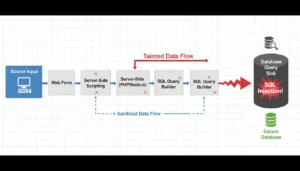
Taint analysis and data-flow tracking are established techniques in program analysis. The idea is simple even though the name sounds technical: trace how untrusted data moves through a program, from where it enters to where it’s used.
Here’s the plain-language version:
- Source: a place where data enters your program that you don’t fully control, like a web form field, a URL parameter, or an uploaded file name.
- Sink: a place where that data gets used in a way that matters, a database query, a command run on the server, or a file path.
- Taint: The label analysts give to data coming from a source until it’s been properly checked or “sanitized.”
Imagine a web app that takes a username from a login form and puts it directly into a database query without checking or cleaning it first. The username field is the source. The database query is the sink. If nothing sanitizes that input in between, no validation, and no escaping: the tainted data flows straight from source to sink, and that’s a classic setup for an injection vulnerability.
Data-flow tracking is just the process of following that path through the code, statement by statement, to see whether anything cleans up the data before it’s used dangerously. This concept of tracing tainted input from source to sink is the theoretical backbone of a lot of vulnerability-detection tooling, both traditional static analyzers and newer AI-assisted approaches. Once you can spot a source, a sink, and the path between them, you have the mental model that the rest of this guide builds on.
How LLM-Assisted Code Slicing Works (at a Beginner Level)
“Code slicing” just means pulling out the small chunk of code that’s actually relevant to a question, instead of reading an entire file line by line. If you’re tracing whether a username input reaches a database query safely, you don’t need every function in the file; you need the lines that carry that data from the entry point to the sink.
An LLM can help with this task in a very approachable way: you give it a chunk of source code and ask it to identify possible source/sink pairs, then reason step by step about whether anything sanitizes the data in between. The model reads the code, follows variable names and function calls, and gives you a plain-language explanation of what it thinks is happening.
This is conceptually similar to what BleepingComputer described Intruder’s tool as doing at scale, using AI to slice through code and reason about data flow, rather than a human manually tracing every path. The difference is scale and automation, not the underlying idea. You can practice the exact same reasoning process yourself, one function at a time, with any general-purpose LLM chat tool.
One important caveat: LLMs can be wrong. They can miss real issues or flag things that aren’t actually exploitable (false positives). That’s precisely why the next section builds in a manual verification step, i.e., never trust an AI’s finding without checking it yourself.
Build a Minimal AI-Assisted Code-Review Pipeline: Step-by-Step Beginner Code-Review Pipeline
You can put together a small, personal learning pipeline this week. This is not a production-grade scanner; it’s a repeatable practice routine to build the skill.
- Pick a target you’re allowed to test. Use a small open-source repository you maintain or an intentionally vulnerable practice application built for learning, such as an OWASP-style deliberately vulnerable project. Never point this exercise at a system, app, or codebase you don’t own or don’t have explicit permission to test.
- Write a simple prompt template. Ask the LLM to read a file or function and identify possible source/sink pairs, places where user-controlled input enters and where it’s later used in a sensitive operation. Ask it to explain its reasoning, not just provide a yes/no answer.
- Manually verify a handful of flagged code paths. Select a few of the model’s flagged spots and trace them yourself, line by line. Confirm whether the data really is tainted, whether any sanitization exists, and whether the model’s reasoning holds up. This step is where the actual learning happens; you’re checking the AI’s homework, not outsourcing your judgment to it.
- Log your findings in a simple tracker. A basic spreadsheet works fine: file/function, source, sink, sanitization present (yes/no), your assessment, and whether the AI’s flag was accurate. Over time, this log becomes a record of your growing skill and a useful portfolio artifact.
Repeat this cycle on a few different small codebases. The goal isn’t to find real vulnerabilities right away — it’s to build the habit of tracing data flow and critically evaluating AI-generated findings.
Tools and Resources to Start With
You don’t need an enterprise budget to practice this skill. A few categories to explore:
- LLM access: General-purpose chat-based LLM tools or APIs (from major AI providers or open-weight models you can run locally) can serve as your code-reasoning assistant.
- Intentionally vulnerable practice apps: purpose-built vulnerable applications exist specifically so learners can safely practice finding real bug patterns without touching live systems.
- Static analysis basics: Before reaching for AI, practice simple “grep-level” source/sink hunting, searching a codebase manually for risky function calls (like raw query builders or command execution) and tracing backward to see where the input came from. Open-source static analysis tools can also help flag candidate spots for you to review.
Exact product names, pricing, and free-tier availability for specific LLM APIs and static analysis tools change frequently, so treat the list as a starting map of categories rather than a fixed shopping list. Please verify the current options and terms before committing to any single tool.
Ethics, Legal Boundaries, and Responsible Practice
This kind of practice has to stay inside clear boundaries. Only test code and applications you own, that you built yourself for practice, or that you have explicit written permission to test, including authorized bug bounty programs and dedicated capture-the-flag (CTF) environments built for learning.
Never run this exercise against a live third-party system, website, or product without permission, even if your intention is purely educational. Unauthorized testing can carry real legal consequences depending on where you live, so if you’re ever unsure whether something is in scope, treat it as off-limits until you’ve confirmed otherwise.
If you ever do stumble onto what looks like a genuine vulnerability in something you weren’t specifically testing, say, in software you use, the responsible move is disclosure, not exploitation. That generally means privately reporting the issue to the vendor or maintainer, allowing them reasonable time to fix it, and not sharing exploit details publicly until a fix is available. Many organizations publish a security contact or bug bounty policy specifically for this purpose.
Where This Skill Takes You: Career Paths and Next Steps
You still need to verify the workflow you’ve just practiced, i.e., spotting sources and sinks, tracing data flow, and using AI as a reasoning assistant—to see if it maps directly onto real jobs. Application security (appsec) engineers do this daily. Security analysts use similar thinking when triaging alerts. Bug bounty hunters build entire practices around finding and responsibly reporting exactly these kinds of issues. And small-business IT teams benefit from being able to do a basic sanity check on third-party code or plugins before installing them.
Once you’re comfortable with the basics, natural next steps include learning dedicated static application security testing (SAST) and dynamic application security testing (DAST) tools, working through structured CTF challenges to practice on realistic vulnerable targets, and exploring beginner-friendly bug bounty platforms once you have a solid foundation and understand program scope rules.
None of this requires you to replicate a vendor’s product. It requires steady, hands-on practice with the same core concepts that make tools like Intruder’s newsworthy in the first place.
Frequently Asked Questions
What is a “vulnerability vending machine,” and how does Intruder’s AI tool actually work?
What are taint analysis and data-flow tracking, and why do they matter for automated vulnerability hunting?
Can a beginner realistically build a mini AI-assisted code-review pipeline without an enterprise budget?
What tools, LLM APIs, and open-source resources do I need to start experimenting today?
What are the legal and ethical boundaries when practicing AI-assisted vulnerability discovery?
Sources: BleepingComputer’s coverage of Intruder’s AI vulnerability tool, OWASP intentionally vulnerable practice projects. Last updated July 2026.