Overview
Domain 5 focuses on the practical aspects of information security, such as Cryptography, Data Handling, Security Controls, and Social Engineering.
It discusses data protection, secure system management, access control, and how attackers take advantage of human behavior. These are the controls and concepts that security experts apply on a daily basis.
This guide clearly defines each major term and contextualizes it so that you understand its purpose, strengths, and limitations.
-
Cryptography Fundamentals
Cryptology, Cryptography, and Cryptanalysis
- Cryptology
The overall field of secure communication. It includes both creating and breaking encryption. - Cryptography
The practice of protecting information by transforming it so its meaning is hidden from unauthorized parties. - Cryptanalysis
The process of breaking encryption by using mathematics, logic, or weaknesses in how the encryption is implemented.
Cipher
A cipher is an algorithm used to encrypt or decrypt data. It defines how plaintext is transformed into ciphertext and back again.
Plaintext vs. Ciphertext
- Plaintext (Cleartext)
Data in its original, readable form. - Ciphertext
Encrypted data that appears unreadable without the correct key.
Encryption vs. Decryption
- Encryption converts plaintext into ciphertext.
- Decryption converts ciphertext back into plaintext.
-
Symmetric, Asymmetric, and Hybrid Encryption
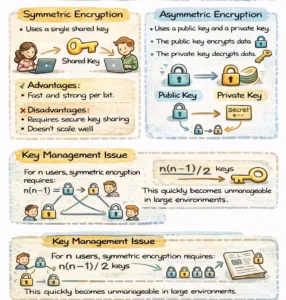
Symmetric Encryption
- Uses a single shared key for both encryption and decryption.
- Advantages: Fast and strong per bit.
- Disadvantages: Requires secure key sharing and does not scale well.
Key Management Issue
For n users, symmetric encryption requires:
n(n − 1) / 2 keys
This quickly becomes unmanageable in large environments.
Asymmetric Encryption
- Uses a public key and a private key.
- The public key encrypts data.
- The private key decrypts data.
Advantages
- No need to pre-share secrets.
Disadvantages
- Slower and computationally expensive.
- Weaker per bit compared to symmetric encryption.
Hybrid Encryption
Hybrid systems combine both approaches:
- Asymmetric encryption is used to securely exchange a session key.
- Symmetric encryption is used for the actual data transfer.
This provides both security and performance and is how modern systems operate.
-
Hashing and Integrity
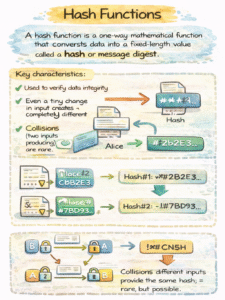
Hash Functions
A hash function is a one-way mathematical function that converts data into a fixed-length value called a hash or message digest.
Key characteristics:
- Used to verify data integrity.
- Even a tiny change in input creates a completely different hash.
- Collisions (two inputs producing the same hash) are rare but possible.
Hashing does not provide confidentiality. It ensures data has not been altered.
-
Attacks on Cryptography
Key Theft
Attackers often bypass encryption entirely by stealing keys, passwords, or certificates.
Brute-Force Attacks
The attacker tries every possible key until the correct one is found. This attack works against all key-based systems except the one-time pad.
Key Stretching
Key stretching intentionally slows password verification, often by 1–2 seconds, making large-scale brute-force attacks impractical.
Man-in-the-Middle (MITM)
An attacker secretly intercepts and possibly alters communication between two parties without their knowledge.
Side-Channel Attacks
Instead of attacking the algorithm, these attacks analyze physical characteristics such as:
- Timing
- Power usage
- CPU activity
- Electromagnetic emissions
-
Data Handling, Classification, and Destruction
Data Handling
Sensitive data should only be accessed by authorized individuals, and all access should be logged and monitored.
Data Storage
Data must be stored in secure locations with:
- Access controls
- Environmental protections
- Monitoring
Data Retention
Data must be kept:
- As long as required for business needs, or
- As long as required by regulation (such as HIPAA or PCI-DSS), whichever is longer.
Paper Disposal
Cross-cut shredding is recommended. Straight-cut shredding can often be reconstructed.
Digital Data Disposal Methods
- Deleting
Removes file references only; data remains recoverable. - Formatting
Rebuilds the file system; data may still be recovered. - Overwriting (Clearing)
Writes zeros or random data to storage locations. - Sanitization
Makes data recovery infeasible for the defined threat level. - Purging
Prevents recovery even using forensic lab techniques. - Degaussing
Uses a strong magnetic field to erase magnetic media, destroying the device. - Physical Destruction
Shredding, crushing, or incineration. This is the most secure and final method.
-
The Information Life Cycle
- Data Acquisition
Data is created or collected and stored. - Data Use
Confidentiality, integrity, and availability must be maintained. - Data Archival
Data is stored for long-term or future use. - Data Disposal
Data is destroyed when no longer needed.
-
Configuration, Patch, and Change Management
Configuration Management
Systems should be hardened before deployment by:
- Closing unused ports
- Disabling unnecessary services
- Removing default accounts
- Scanning for vulnerabilities
- Using hardened images
- Monitoring configuration changes
Patch Management
Regularly applying updates to:
- Operating systems
- Network devices
- IoT devices
- Storage systems
This reduces known vulnerabilities.
Change Management
A formal process to control modifications:
- Identify the change
- Propose the change
- Assess risk
- Obtain approval
- Test
- Schedule
- Notify stakeholders
- Implement
- Perform post-implementation review
-
Access Controls
Access Control Categories
- Administrative (Directive)
Policies, procedures, and standards. - Technical
Firewalls, encryption, authentication systems. - Physical
Locks, guards, cameras, fences.
Access Control Types
- Preventative – Stop incidents before they occur
- Detective – Identify incidents
- Corrective – Fix issues
- Recovery – Restore systems and data
- Deterrent – Discourage attacks
- Compensating – Alternate controls when primary controls are not possible
-
Information Security Governance
Policies (Mandatory Controls)
Common examples include:
- Acceptable Use Policy (AUP)
- Bring Your Own Device (BYOD) Policy
- Privacy Policy
- Password Policy
Data States
- Data at Rest – Stored data
- Data in Motion – Data being transmitted
- Data in Use – Actively processed data (cannot be encrypted)
Security Awareness vs. Training
- Training builds knowledge and skills.
- Awareness changes behavior and reduces real-world risk.
-
Social Engineering and Human Attacks
What Is Social Engineering?
Social engineering manipulates people into bypassing technical controls.
Common Psychological Techniques
- Authority
- Intimidation
- Social proof
- Scarcity
- Urgency
- Familiarity
Social Engineering Attack Types
- Phishing – Mass emails targeting many users
- Spear Phishing – Targeted attacks against specific individuals
- Whaling – Spear phishing aimed at executives
- Vishing – Voice-based phishing via phone calls or automated systems
https://thecyberskills.com/phishing-attack-red-flags-protection/
Conclusion: What Domain 5 Covers
Domain 5 ties together the human, technical, and procedural elements of security. It includes:
- Cryptography and hashing
- Data handling and destruction
- Configuration, patch, and change management
- Access control models
- Security governance
- Awareness and training
- Social engineering attacks
Understanding these concepts is essential for protecting systems not just in theory, but in real-world environments.